

Usage
After installation, a MODX resource contains a new Translate button. This button opens a menu for translating the resource.

The first section of the menu contains (if available) all linked babel contexts
and provides a translation from the context language set with the context
setting cultureKey.
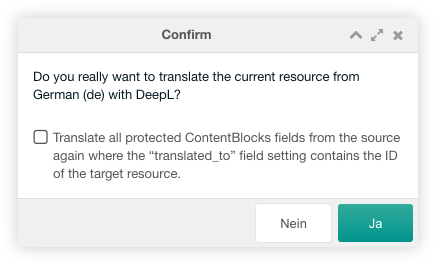
After klicking on the Translate from button a confirm window is shown. In this
window you can activate the translation of protected ContentBlocks fields.
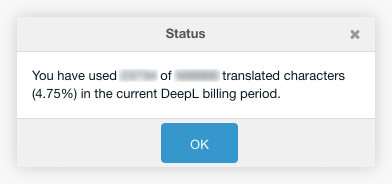
The second section of the menu contains a menu entry, that shows the usage status of the DeepL API.
Protected ContentBlocks Fields
The protection of the translation of ContentBlocks fields can be enabled with
the babeltranslate.use_protected system setting. If a ContentBlocks field
contains the translated_to field setting and the field setting of the source
ContentBlocks field contains the ID of the target resource, this ContentBlocks
field will not be translated again per default. The translated_to field
setting is automatically filled with the ID of the target resource when the
target resource is translated from the source resource.
You can disable this protection by checking the checkbox in the Translate From
window.
If you want to permanently disable this protection for the Babel menu items
Update Multiple Translations or Update Translation, enable the system
setting babeltranslate.translate_protected.
Warning
With this setting, you are currently allowing the user to reset translations in all already translated target resources without confirmation. This may be addressed in a less destructive way in a future version of Babel with an additional checkbox.
Available DeepL Languages
The source language list is created by linked Babel resources and their
cultureKey setting. The target language is set with the cultureKey setting
of the current resoures context.
The following source and target languages are currently available. This list is maybe incomplete. The latest source and target languages for DeepL can be found in DeepL API Translate Text:
Source Languages
| Key | Language |
|---|---|
ar |
Arabic |
bg |
Bulgarian |
cs |
Czech |
da |
Danish |
de |
German |
el |
Greek |
en |
English |
es |
Spanish |
et |
Estonian |
fi |
Finnish |
fr |
French |
hu |
Hungarian |
id |
Indonesian |
it |
Italian |
ja |
Japanese |
ko |
Korean |
lt |
Lithuanian |
lv |
Latvian |
nb |
Norwegian (Bokmål) |
nl |
Dutch |
pl |
Polish |
pt |
Portuguese (all Portuguese varieties mixed) |
ro |
Romanian |
ru |
Russian |
sk |
Slovak |
sl |
Slovenian |
sv |
Swedish |
tr |
Turkish |
uk |
Ukrainian |
zh |
Chinese |
Target Languages
| Key | Language |
|---|---|
ar |
Arabic |
bg |
Bulgarian |
cs |
Czech |
da |
Danish |
de |
German |
el |
Greek |
en |
English (unspecified variant for backward compatibility; please select en-GB or en-US instead) |
en-GB |
English (British) |
en-US |
English (American) |
es |
Spanish |
et |
Estonian |
fi |
Finnish |
fr |
French |
hu |
Hungarian |
id |
Indonesian |
it |
Italian |
ja |
Japanese |
ko |
Korean |
lt |
Lithuanian |
lv |
Latvian |
nb |
Norwegian (bokmål) |
nl |
Dutch |
pl |
Polish |
pt |
Portuguese (unspecified variant for backward compatibility; please select pt-BR or pt-PT instead) |
pt-BR |
Portuguese (Brazilian) |
pt-PT |
Portuguese (all Portuguese varieties excluding Brazilian Portuguese) |
ro |
Romanian |
ru |
Russian |
sk |
Slovak |
sl |
Slovenian |
sv |
Swedish |
tr |
Turkish |
uk |
Ukrainian |
zh |
Chinese (simplified) |
If the target language has multiple dialects, the first dialect in the above
list is automatically selected. If, for example, translation to en-US is
required, then this can be specified in an additional context setting
translationKey. This context setting overwrites the cultureKey context
setting.